
Sina Weibo is one of the most famous social media platforms in China. If you want to promote your business, then Weibo would be a highly recommended tool. You can post something about your products or services on Weibo. It’s a good way to promote business in China. So, before promoting your business in China, you need to create a Weibo account from outside of China. I will teach you 3 ways to sign up Weibo account for foreigners step by step.
You may also need this: Top 10 Chinese Social Media
What is Weibo?
Weibo is a microblogging in China, you can post your blog on there, which means you can post text, video, images on there. You can find the most trending topics on there. Some features are just the same as Twitter. If you are a popular person, organization, company, and so on, you could verify your identity on Weibo.
Weibo got so many users, even the Chinese government. So, if you use it well to promote your business, that would be great huge traffic and cause a wide range of social influences.
Can I create Weibo in my country? Many users got that question. So I list the country below.
Countries that can use Weibo
| China | 中国 |
| Hong Kong Region China | 中国香港 |
| Macao Region China | 中国澳门 |
| Taiwan Region China | 中国台湾 |
| Singapore | 新加坡 |
| United States (USA) | 美国 |
| Canada | 加拿大 |
| Australia | 澳大利亚 |
| Germany | 德国 |
| France | 法国 |
| England | 英格兰 |
| United Kingdom(UK) | 英国 |
| Italy | 意大利 |
| Spain | 西班牙 |
| Russia | 俄罗斯 |
| Korea | 韩国 |
| Japan | 日本 |
| Malaysia | 马来西亚 |
| Indonesia | 印度尼西亚 |
| Philippines | 菲律宾 |
| Vietnam | 越南 |
| Laos | 老挝 |
| Myanmar | 缅甸 |
| Cambodia | 柬埔寨 |
| Thailand | 泰国 |
| India | 印度 |
| Brunei | 文莱 |
| Brazil | 巴西 |
| Poland (New) | 波兰 |
| New Zealand(New) | 新西兰 |
You might try both the Chinese version and the English version of Weibo to sign up Weibo account for foreigners.
Some of these countries are listed in Chinese. And you don’t know Chinese, So I’ve translated Chinese into English. Hope that will be helpful.
NOTE: Poland and New Zealand can use Weibo in the latest app version (Chinese App version), you might not able to find Poland and New Zealand in the list if you are using Weibo English version. Poland(波兰) can be found on Chinese App and webpage, but New Zealand(新西兰) can only be found on Chinese App.
India can’t use Weibo unless using VPN, because the Indian government restricts China’s social media.
What if my country is not on the list?
You can choose to sign up Weibo via Email. I will show you later.
Does Weibo has English version?
Yes. You can download the English version of Weibo from Google Play Store or Apple Store.
How to sign up Weibo account?
It would be not easy to sign up for Weibo account lately, because you might get errors like “Weibo too many SMS requests“, “can’t receive SMS code“, “Weibo verification code not working“etc. So you might need to try each method, via the Weibo.com webpage, Weibo International app, Weibo Chinese app.
Sign up Weibo account via webpage
Step 1: Go to Weibo.com.
The Weibo.com webpage might be in Chinese, in this case, you need to change Weibo language from Chinese to English.
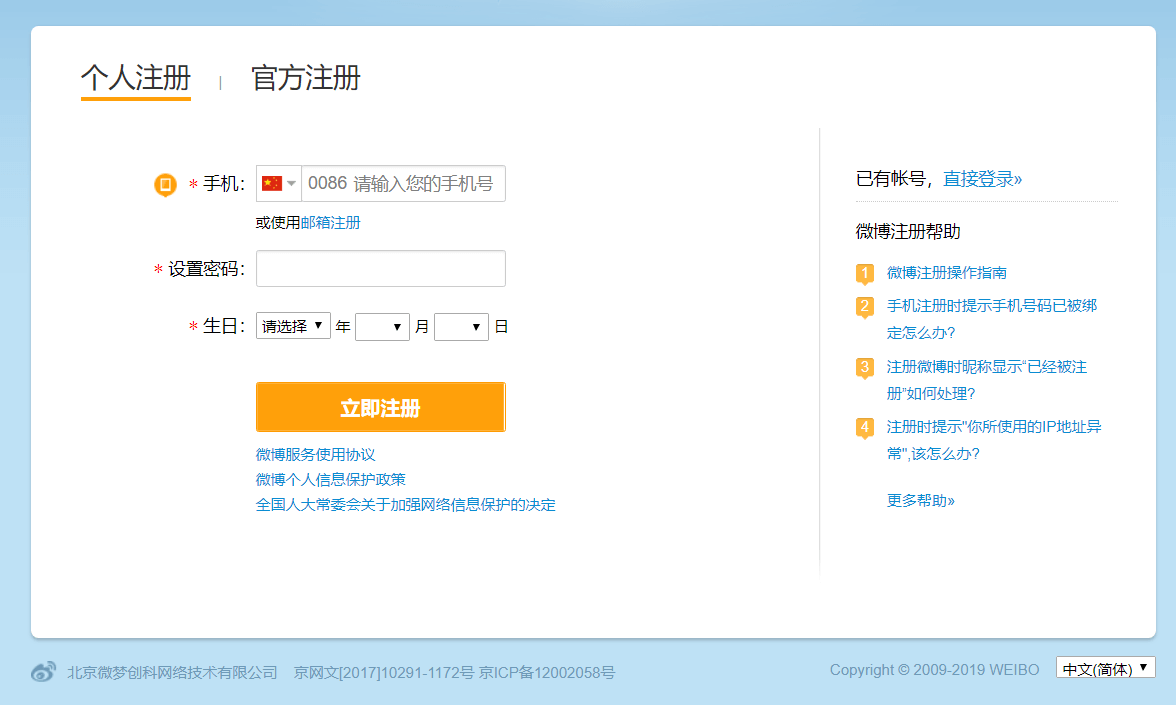
In this case, you might think it would be a challenge to sign up Weibo account outside of China. Actually, you don’t need to worry about that.
Step 2: Change language to English.

You can go to the language option on the bottom right corner of the page. Click on that and then you can select English or traditional Chinese language.
Also, you can click the link to go to Weibo.com English webpage directly.
Step 3: Fill out your profile.
Email: Enter your email address. (No this option now)
Once you sign up for Weibo with email, then this email will be your login name.
Phone number: Choose the country on the list and enter your phone number. The country’s names are in Chinese and English, which is quite messy. You can find it from the table above. Or use Google translate it.
Password: set up your password.
The password should be 6-16 numbers, letters, or combinations to make sure your password is secure enough.
Birthday: After that, you need to select your birthday, you can select any age you want except for those under 18 years old. Because China has a really strict rule for under 18-years generation.

Step 4: SMS code verification.
Click on [Get A-code for free] and then enter the SMS code. If you don’t get an SMS code message, then you can request SMS again by clicking [收不到验证码?]
This is the most frustrating step in Weibo account registration. Because many users don’t get SMS code at all, So they requested SMS code again and again. But this is not the correct way to sign up for any Chinese social media platforms.
Because the platforms might think you are a bot. And might block your IP and devices. That said, never request SMS code too frequently.
Step 4:Complete your personal information.

After verifying, you might be required to complete your personal information, such as your nickname, gender, birthday, and location. This location had better choose as where you live now.
Step 5:Pick your interests.
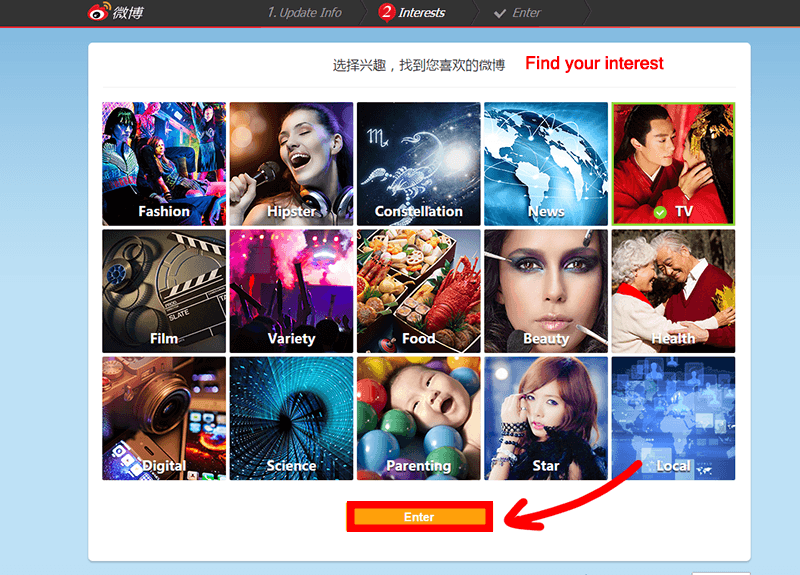
Pick at least one topic you’re interested and then click on [Enter].
Sign up Weibo account via International app
Weibo App has English version and Chinese version. English version of Weibo does not have ads and lesser features than the Chinese Weibo.
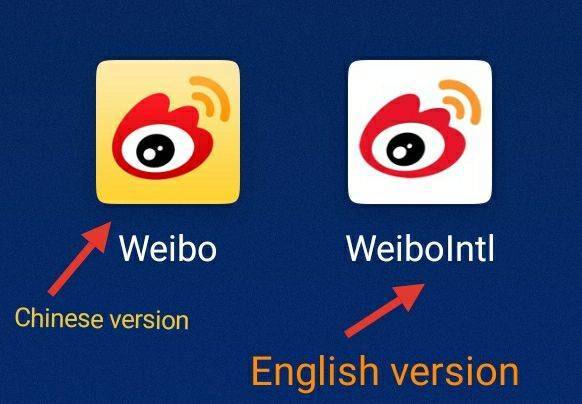
Step 1: Download qq international from Google play store or Apple store.
Step 2: Open Weibo app and click on [Got it].
Step 3: Click on [Start now].
Step 4: Tap [Sign up].
Step 5: Select your region and enter your phone phone number.
Step 6: Check privacy policy box and then click on [Next].

Step 7: Enter the SMS code that sent you.

Step 8: Click on that circle icon to verify you.

Sign up Weibo account via Chinese app
As I mentioned before, Chinese Weibo has more features than English version, but there will be more ads too. And the Weibo Chinese also supports English language. If you don’t see the English language at the interface, you can change it to English.
The reason why you should try Chinese Weibo that’s because it may have more chance to SMS code than others. So if you can’t get SMS code when you register Weibo account. You should try this way.
Step 1: Download Weibo Chinese version.
You can download 微博(Chinese version of Weibo) from Google Play Store or Apple Store. If you can’t get it, you might need to download it from the Chinese App Store.
Step 2: Allow phone permissions.

Step 3: Select region and then enter mobile phone number.
The version that I use right now, doesn’t show up the sign-up button. If you see the sign-up button you can click on it. If not, you can fill out your phone number, and then the registration will proceed if mobile number is unregistered.

Step 4: Click on [Get Code] to receive a SMS code.
Step 5: Enter SMS code and click on [Login].
Step 6: Select your gender and birthday.
NOTE: Please select your age above 18 years.
Step 7: Select at least 5 topics that you’re interested in.
Step 8: Upload profile picpicture and set up a nickname.
Can’t receive SMS code?
The errors like “Weibo too many SMS requests“, “can’t receive SMS code“, “Weibo verification code not working“etc. That’s the most frustrating thing when you create Weibo account.
The reason is quite various. And the code might be blocked by your country or the code didn’t send successfully. You can check your message blocked list to check if blocked by your phone.
What I highly recommend way is switching to signing up for Weibo between webpage, English app, and Chinese app.
But, never request SMS code too frequently, otherwise, you will be detected as a bot registration. That will make things worse.
If you have questions, please comment below. And let me know you get a Weibo account or not. Thank you!

